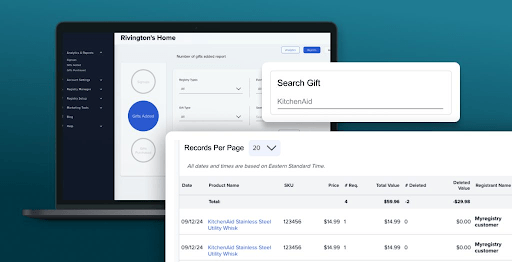
Finding specific products in your Partner Dashboard just got easier.
You can now quickly search for products in the Gifts Added section using either a SKU or keyword. You can also download reports based on your search results, making it easier to find and work with the product data you need.
Search Products by SKU or Keyword
The new search box is available at the top of the Gifts Added section in your Partner Dashboard.
Simply enter:
- SKU to find a specific product
- Keywords to find products matching your search
This makes it much easier to locate products, especially when working with a large number of gifts added from your store.
Download Reports Based on Your Search
Need to review or share the results?
Once you’ve searched for the products you need, you can download a report matching your search query. This gives you a convenient way to work with the filtered product data outside of the dashboard.
Save Time When Managing Gift Data
The new search functionality helps make everyday product management faster and more efficient. Instead of browsing through the entire Gifts Added section, you can go directly to the products you’re looking for.